


Gospel Stream
3.9146.00 Reviews
App Specs
- Version
- 1.8.1-(2715.3379327)
- Updated On
- License
- Free
- Downloads
- 100,000+
- Developer
- The Church of Jesus Christ of Latter-day Saints
- Categories
- Books & Reference
- Platform
- Android
Screenshots
 Analysis by AppCompare
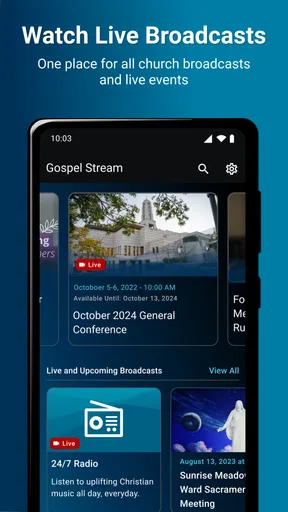
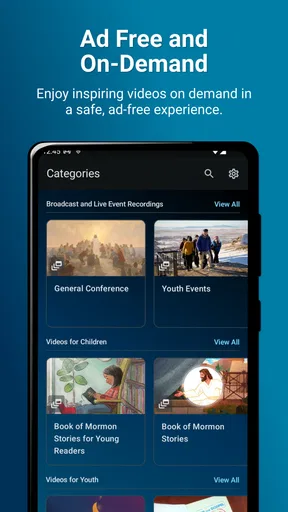
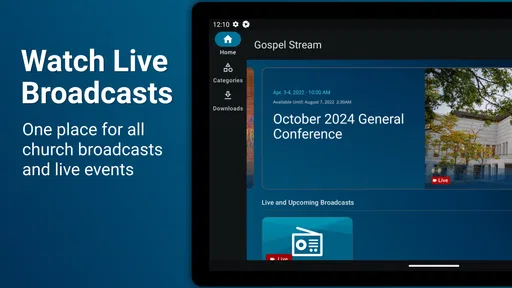
If you are looking for a simple way to watch broadcasts and video material from The Church of Jesus Christ of Latter-day Saints, Gospel Stream is designed for that exact purpose. I found it most useful as a focused viewing app rather than as a broad religious library or a general video platform. Its value comes from keeping church video content in one place, with less distraction than the usual alternatives.
The app belongs to the Books & Reference category, is free to use, and is suitable for everyone. It was developed by The Church of Jesus Christ of Latter-day Saints, and its main promise is straightforward: open the app, find a relevant broadcast or video, and watch it. That narrow purpose is also its main strength. You are not installing it for games, social discussion, or a large collection of unrelated reading material.
What to expect when you open Gospel Stream
My first impression was that Gospel Stream makes more sense when you already know why you want to use it. If you are preparing for a church broadcast, trying to watch a message shared by the Church, or looking for official video content without searching through a general service, the app has a clear role. It feels like a dedicated doorway rather than an all-purpose media center.
The current release is version 1.8.0-(2696.3284050), and the app requires Android 8.0 or later. That requirement is worth checking before you plan to use it on an older phone or tablet. On a compatible device, the basic experience is easy to understand: you are there to browse available church videos and start watching them.
Gospel Stream has reached over one hundred thousand installs and holds an average rating of about 3.9 from roughly one thousand ratings. I would read that as evidence of a useful but not universally perfect experience. The app clearly serves a real audience, yet the rating also suggests that convenience, navigation, or device-specific behavior may not feel equally smooth for everyone.
One important expectation is that this is primarily a viewing tool. I would not choose it if my main goal were to study a topic through detailed written references, compare many translations, or participate in a community conversation. A dedicated scripture app or the Church’s broader digital resources may be a better fit for those tasks. Gospel Stream is strongest when the content you need is presented as a broadcast or video.
Who will get the most from it
I can see this app being especially helpful for members who want an uncomplicated way to follow Church broadcasts on a personal device. It can also suit families who prefer watching together on a phone or tablet, provided the screen and audio are comfortable for everyone. Someone who travels often may appreciate having a familiar place to check for official video content instead of relying on scattered searches.
Worth Reading Before You Choose

EA SPORTS FC Mobile 26 Is a Bigger Football Game, but It Takes Time

Flipboard Shows What News Apps Must Do Beyond the Feed

Switching to Android Auto Means Rethinking Your Driving Routine

Google Calendar Makes a Crowded Week Easier to Manage

Ludo King Makes the Most of the Minutes Between Plans

Baby Panda World Brings Quick Play to Modern Phones, but Its Game Library Feels Busy
It is also a reasonable choice for a first-time viewer who does not want to learn a complicated media service. The app’s focused identity reduces the number of decisions you have to make. You are not starting with a huge entertainment catalog and trying to filter it down to religious material. You begin in a space built around that material.
On the other hand, I would skip it if you want a general-purpose video player, offline media management, or a single app that combines video with extensive reading and study tools. Those expectations can make a focused broadcast app feel limited. The right question is not whether Gospel Stream replaces every other Church resource; it is whether it gives you a convenient route to the video content you actually want.
From installation to your first meaningful watch
I find the first few minutes are easier when I treat installation as the start of a specific viewing task, not an invitation to explore every screen. This section walks through choosing a purpose, checking that the device suits the occasion, and deciding whether the first watch feels comfortable. That practical test also helps explain why a focused app can still feel unfamiliar at first.
Start by checking the device and keeping the goal simple
Before installing, I would check that the Android device runs version 8.0 or newer. That small step prevents an avoidable surprise. I would also decide what I am trying to watch before opening the app: a current broadcast, a particular message, or simply a selection of available videos. Having that purpose in mind makes the first session feel more successful.
Because the app is free, there is no purchase decision to make before trying it. Its content rating is Everyone, so it is presented as suitable for a broad audience. For a family device, I would still take a moment to set the volume and screen position before starting, especially if the intention is to watch as a group rather than privately.
After installation, I would avoid judging the entire app from the first screen alone. A dedicated video app can look sparse compared with a large streaming service, but that is not automatically a weakness. What matters is whether you can move from opening the app to locating something relevant without unnecessary searching.
Choose one video instead of browsing without a plan
My recommended first action is to select a video that matches your immediate reason for installing. If you opened Gospel Stream because you were told to watch a broadcast, look for that broadcast first rather than exploring every section. If you are just getting familiar with the app, choose one clearly identified video and begin playback. The first meaningful success is not learning every screen; it is watching the material you came for.
This approach also gives you a practical way to evaluate the app. Notice how quickly you recognize the available content, whether the titles make sense to you, and whether playback begins comfortably on your device. Those observations are more useful than simply scrolling through the catalog. If the app helps you reach the intended video with little effort, it is doing its central job well.
I would keep the first session deliberately short. Watch enough to confirm that the picture, sound, and controls work for you, then decide whether the app deserves a regular place on your device. This is particularly helpful on a phone, where a service that looks convenient in theory may be less comfortable for longer viewing than a tablet or television setup.
A realistic everyday scenario
Imagine that I am away from home when a family member reminds me about a Church broadcast. Instead of opening a general video platform and trying to identify the correct official result among unrelated uploads, I can open Gospel Stream and look for the broadcast there. Once I find it, I can settle into watching without turning the search itself into a separate task.
Another useful situation is a quiet evening when I want to share a message with someone who is not familiar with the Church’s media resources. I can show them the dedicated app, explain that it is intended for Church broadcasts and videos, and start with one item that fits the conversation. That feels more reassuring than sending them into a broad search page with many possible results.
For a family, I would treat the app as the source and use the device as the viewing surface. A phone may be fine for individual use, while a larger screen may be more practical for several people. The app’s focused content does not remove the ordinary realities of screen size, speaker quality, and the comfort of watching for an extended period.
Small habits that make the experience easier
One habit I found useful is to separate discovery from viewing. First identify what you want to watch, then start playback and stop browsing. Constantly moving between items can make a focused app feel less productive, while choosing one relevant video gives the session a clear purpose.
A second habit is to use the app as a companion to your schedule rather than as something you open without a reason. If you know a broadcast or message is part of a family discussion, lesson preparation, or personal reflection, opening Gospel Stream at that moment gives the service a practical place in your routine.
A third tip is to test the experience before an important viewing time. Open the app earlier in the day, find the content you expect to watch, and confirm that your device is comfortable for the task. This is not a special feature; it is a simple workflow that reduces last-minute frustration and helps you decide whether your phone, tablet, or another screen is the better choice.
Common confusion and the limits of a focused video app
A dedicated video app can be mistaken for a full study library or a general streaming service, so I think it helps to set expectations before judging it. Here I separate what Gospel Stream is meant to do from the jobs better handled elsewhere, and suggest a simple way to respond if the first session feels unclear. That distinction leads naturally to where the app can fit into a regular routine.
It is not the same as a complete study library
The biggest source of confusion is expecting Gospel Stream to behave like a full study application. Its identity is centered on broadcasts and videos. If I want to search deeply through written material, mark passages, compare references, or build a detailed study routine, I would look for a more specialized resource instead.
That distinction matters because a video can explain or inspire, but it does not replace every form of reference work. Someone preparing a lesson may want both: Gospel Stream for watching an official message and another resource for reading and organizing supporting material. Trying to force one app to handle both jobs can make its limits feel more serious than they really are.
It is not a general streaming replacement
Another possible misunderstanding is assuming that a dedicated Church video app should offer the breadth, recommendations, and entertainment features of a mainstream streaming service. I would not compare them on equal terms. A general platform is better for variety, personalized discovery, and mixed media. Gospel Stream is better when the narrow subject is exactly what I want and I prefer not to sort through unrelated content.
The trade-off is clear: focus reduces distraction, but it can also reduce variety. If you open the app hoping to find every kind of religious resource, you may feel that it does not go far enough. If you open it specifically to watch Church broadcasts and videos, the same focus becomes its most useful quality.
What to do when the first session feels unclear
If you are unsure where to begin, return to the simplest question: what do I want to watch right now? Use the available titles and sections as a route to that answer rather than trying to understand the whole app at once. Selecting one relevant item is a better test than browsing aimlessly.
If playback or navigation does not feel comfortable, I would first consider the device itself and the viewing context. A small phone screen, weak built-in audio, or an awkward family seating arrangement can affect your impression even when the content is suitable. Trying the same video in a more comfortable setup can tell you whether the issue is the app’s usefulness or simply the way you are using it.
The average rating of around 3.9 also encourages a balanced approach. I would not install it expecting a flawless experience on every device, but I would give it a fair test based on its main purpose. The question is whether it reliably helps you reach the Church video content you care about, not whether it offers every convenience found in larger media platforms.
Privacy and account expectations
For a first-time user, it is natural to wonder whether an app like this requires a complicated account process. I would approach the opening screens calmly and follow only the steps needed to reach the content. Avoid assuming that every prompt represents a necessary part of watching; read each one and decide whether it relates to your intended use.
More broadly, I would keep the app’s role clear in my mind. It is a content-viewing tool from The Church of Jesus Christ of Latter-day Saints, not a replacement for every digital service connected with the Church. That expectation helps prevent confusion if you later need a different resource for reading, searching, or organizing personal study.
Where it fits in a regular routine
After the first successful watch, the next step is to decide whether Gospel Stream deserves a permanent place on your home screen. I would keep it installed if I regularly watch Church broadcasts or prefer official video content gathered in a dedicated app. The free price makes that decision easy: there is little risk in trying it and keeping it available for the occasions when it is useful.
I would be more selective if I rarely watch video or mainly use religious apps for reading and reference. In that case, another app may serve your daily habits better, and Gospel Stream may be something you open only when a broadcast or specific video gives you a reason. That is not a failure; it is simply a sign that the app has a specialized purpose.
One practical routine is to use it before a planned discussion. I can watch a relevant message first, note the main idea mentally, and then use a separate reference tool if I need written context. This two-app approach is more realistic than expecting Gospel Stream to provide every stage of preparation. Its strength is the viewing stage, where a focused source can be more convenient than a broad search.
For families, I would agree on the viewing device in advance. A phone is personal and portable, while a tablet may make shared viewing easier. The app does not need to become the center of the family’s digital life; it only needs to make the selected broadcast or video easy to reach when everyone is ready.
In my experience, the best reason to recommend Gospel Stream is its clarity of purpose. It gives people who want Church broadcasts and videos a direct, uncomplicated option, without asking them to treat a general platform as a specialized library. The main limitation is the same thing: if your needs extend beyond video, you will probably want another resource beside it.
My final recommendation is simple: install Gospel Stream if official Church video content is a regular part of your routine, and begin with one specific broadcast or message rather than trying to explore everything at once. It is free, accessible to everyone, and focused enough for a first-time user to reach a meaningful result quickly. I would not call it an all-in-one study solution, but as a dedicated way to watch Church broadcasts and videos, it has a clear and worthwhile place.
Pros
- Easy access to Christian sermons
- worship
- and Bible-focused content.
- Helpful for discovering new ministries and faith-based programs.
- Suitable for personal devotion
- reflection
- and spiritual encouragement.
- Streaming format makes content convenient to watch at home or on the go.
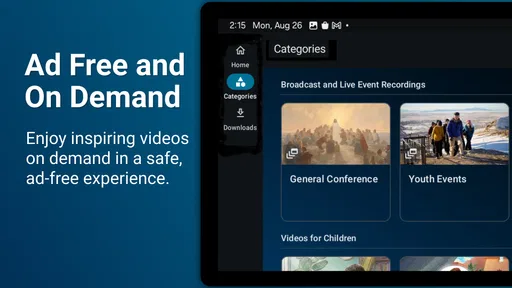
- A focused catalog avoids the distractions found on general video platforms.
Cons
- Content variety may depend heavily on the available ministries and channels.
- Some videos may require a stable internet connection for smooth playback.
- Streaming can consume significant mobile data when used without Wi-Fi.
- Production quality may vary between different programs and broadcasters.
- The app may not appeal to users seeking broader secular entertainment content.
FAQs for Gospel Stream
What is Gospel Stream, and what type of content does it offer?
Gospel Stream is a faith-based streaming app designed for users who want to watch and listen to Christian content in one place. Depending on the available catalog, it may include sermons, worship services, Bible teachings, interviews, conferences, inspirational programs, and family-friendly media. The exact selection can vary by region and may be updated over time, so users should explore the categories after installation.
Is Gospel Stream free to download and use?
The Gospel Stream app can generally be downloaded without paying an installation fee, but access to particular programs or features may depend on the service’s current terms. Some content may be available freely, while other options could require an account, subscription, donation, or connection to an affiliated organization. Before using the app extensively, review the pricing information shown in the official Google Play Store or Apple App Store listing.
Does Gospel Stream require an account or personal information?
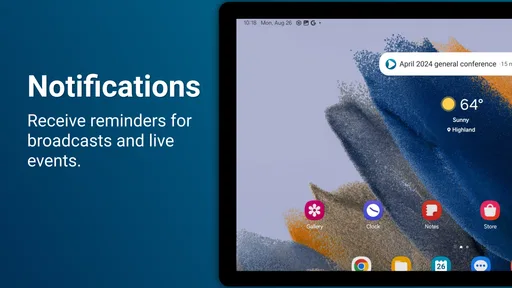
Some users may be able to browse or watch selected content without registering, while additional features can require an account. Registration may be used to save preferences, synchronize viewing activity, receive recommendations, or access restricted material. When creating an account, check which details are requested and read the privacy policy so you understand how your information, viewing history, and notification preferences may be handled.
Can I watch Gospel Stream without an internet connection?
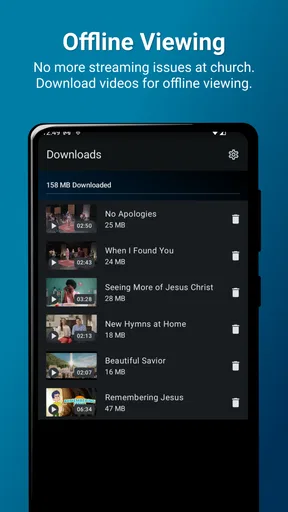
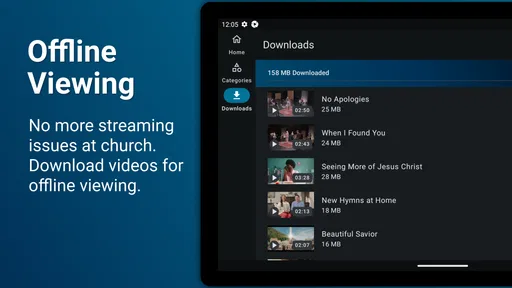
Offline viewing depends on the features enabled by the current version of Gospel Stream and the rights associated with each program. If downloads are supported, eligible videos may be saved while connected to Wi-Fi and watched later, although downloaded content can expire or require periodic verification. If no download option appears, a stable mobile-data or Wi-Fi connection will be necessary for streaming.
Is Gospel Stream available on both Android and iPhone?
Gospel Stream availability depends on the developer’s official distribution and the country associated with your device’s store account. Users should search for the app by its exact name in Google Play for Android or the Apple App Store for iPhone and confirm the publisher before downloading. Device compatibility, language support, and certain features may differ between Android and iOS versions.


